MTM: A Powerful Tab Manager for Chrome
MTM is a free Chrome extension developed by Sumit Matta. It falls under the category of Browsers and specifically the subcategory of Add-ons & Tools. MTM is a tab manager that offers a range of features to help users efficiently manage their tabs.
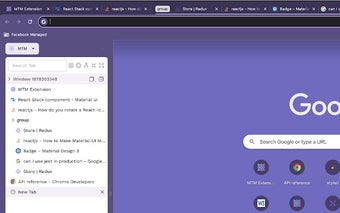
With MTM, users can have multiple windows and groups, allowing them to organize their tabs in a way that suits their workflow. Tabs can be easily moved from one window or group to another, making it simple to reorganize and rearrange tabs as needed. Additionally, MTM allows users to group tabs by website, making it easier to keep related tabs together.
One of the standout features of MTM is its focus mode. This mode helps users stay focused by collapsing all tabs except for the active one. It provides a clutter-free environment, minimizing distractions and enhancing productivity.
MTM also offers several additional features to enhance tab management. Users can quickly expand and close groups, merge all windows into a single window, and group all ungrouped tabs with just a few clicks. The extension also provides the ability to rename tab groups, search and select tabs, and even move selected tabs with a keyboard shortcut.
The user interface of MTM is clean and intuitive, providing a seamless tab management experience. The extension also offers the ability to customize the side panel by displaying it on the left side of the browser.
To use MTM, users need to have Chrome version 114 or above. If users encounter any bugs or have suggestions for new features, they can reach out to the developer through the GitHub page.
Overall, MTM is a powerful tab manager that offers a range of features to help users efficiently organize and manage their tabs in Chrome.